✅作者简介:热爱科研的Matlab仿真开发者,修心和技术同步精进,matlab项目合作可私信。
🍎个人主页:Matlab科研工作室
🍊个人信条:格物致知。
更多Matlab完整代码及仿真定制内容点击👇
🔥 内容介绍
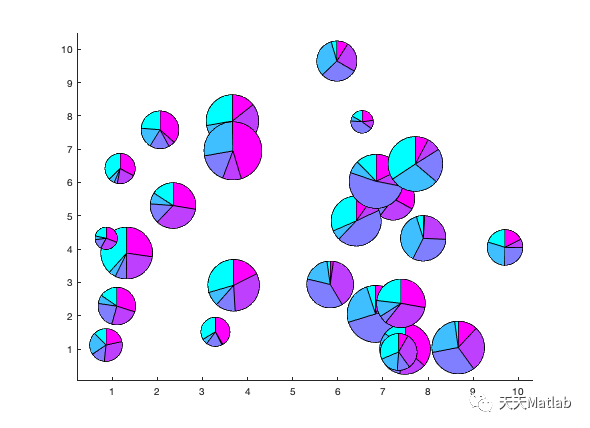
气泡饼图是数据可视化中一种独特而有趣的图表类型。它将饼图和散点图的特点结合在一起,通过展示数据的比例和分布情况,使得观察者能够更直观地理解数据背后的含义。在本文中,我们将深入探讨气泡饼图的特点、应用场景以及如何创建和解读这种图表。
首先,让我们来了解一下气泡饼图的基本构成。与传统的饼图相比,气泡饼图在每个扇形区域内添加了一个气泡,气泡的大小代表了该区域所占比例的大小。这种设计使得气泡饼图能够同时展示数据的相对比例和绝对数值,提供了更全面的信息。
气泡饼图的应用场景非常广泛。首先,它常用于展示不同类别或组织之间的比例关系。例如,在市场调研中,我们可以使用气泡饼图来展示各个品牌的市场份额,气泡的大小代表了各个品牌的销售额。这样一来,我们可以直观地看到不同品牌之间的相对比例以及整个市场的规模。
此外,气泡饼图还可以用于展示多维数据之间的关系。例如,在人口统计学中,我们可以使用气泡饼图来展示不同年龄段的人口比例,气泡的大小可以表示该年龄段的人口数量。这样一来,我们可以通过观察气泡饼图,快速了解不同年龄段的人口分布情况。
在创建气泡饼图时,我们需要注意一些关键的步骤。首先,我们需要确定要展示的数据集,并将其按照比例转换为角度。然后,我们需要计算每个扇形区域的起始角度和结束角度。接下来,我们可以根据数据的绝对数值确定每个扇形区域内气泡的大小。最后,我们可以使用数据可视化工具或编程语言来创建气泡饼图,并添加必要的标签和图例,使得图表更易于理解和解读。
解读气泡饼图时,我们需要注意一些关键的要点。首先,我们应该关注气泡的大小,以了解不同区域所占比例的大小。其次,我们可以比较不同区域之间的气泡大小,以了解它们之间的相对比例。此外,我们还可以观察气泡的位置和分布情况,以获取更多关于数据的洞察。
总结一下,气泡饼图是一种独特而有趣的数据可视化工具,它能够同时展示数据的比例和分布情况。通过使用气泡饼图,我们可以更直观地理解数据背后的含义,并从中获取有价值的洞察。在今天数据驱动的世界中,气泡饼图无疑是一种强大的工具,帮助我们更好地理解和传达数据。无论是市场调研、人口统计学还是其他领域,气泡饼图都将成为我们分析和展示数据的重要利器。
📣 部分代码
BubbleChart ExamplesA BubblePie chart visualizing the revenue of an imaginary store that sells pizza ingredients.XData = 2015:2017;YData = [50 80 65];PieData = [12,26,12; 40,15,25; 10,10,45];b = bubblePieChart(XData, YData, PieData);b.LineStyle = 'none';b.Labels = {'Basil','Tomatoes','Cheese'};colororder([.47 .67 .19; .85 .33 .1; 1 1 .1]);xlabel("Year")ylabel("Revenue (thousands)")title("Pizza Ingredient Sales")A BubblePie chart plotting 25 pies with random data and sizes.XData = 10 * rand(1,25);YData = 10 * rand(1,25);PieData = rand(25,5);SizeData = 40 * rand(1,25) + 20;b = bubblePieChart(XData, YData, PieData, SizeData);colororder(cool(5));b.LegendVisible = 'off';
classdef bubblePieChart < matlab.graphics.chartcontainer.ChartContainer & ... matlab.graphics.chartcontainer.mixin.Legend % bubblePieChart Creates a bubble pie chart. % bubblePieChart(x,y,p) create a bubble pie chart with the specified % pie locations and data. The sizes of the pies are determined % automatically based on the pie data. % % bubblePieChart(x,y,p,s) create a bubble pie chart with % the specified size for each pie in points, where one point equals % 1/72 of an inch. s can be a scalar or a vector the same length as x % and y. If s is a scalar, the same size is used for all pies. % % bubblePieChart() create a bubble pie chart using only name-value % pairs. % % bubblePieChart(___,Name,Value) specifies additional options for % the bubble pie chart using one or more name-value pair arguments. % Specify the options after all other input arguments. % % bubblePieChart(parent,___) creates the bubble pie chart in the % specified parent. % % b = bubblePieChart(___) returns the bubblePieChart object. Use b % to modify properties of the plot after creating it. % Copyright 2020-2021 The MathWorks, Inc. properties % x-axis locations of the pies XData (1,:) = [] % y-axis locations of the pies YData (1,:) = [] % Pie data, specified as a matrix, where each row corresponds to % the data for one pie PieData {mustBeNumeric} = [] % Pie sizes, diameters in points (1/72 inch) SizeData (1,:) {mustBeNumeric} = 50 % Line style to use for drawing pies LineStyle {mustBeMember(LineStyle,{'-', '--',':','-.','none'})} = '-' % Names of the pie categories Labels (:,1) categorical = categorical.empty(0,1) % Title of the plot Title (:,1) string = "" % Subtitle of the plot Subtitle (:,1) string = "" % x-label of the plot XLabel (:,1) string = "" % y-label of the plot YLabel (:,1) string = "" % Mode for the x-limits. % Note that it is not a dependent property since auto limits are % set by the chart and not the axes XLimitsMode (1,:) char {mustBeAutoManual} = 'auto' % Mode for the y-limits. YLimitsMode (1,:) char {mustBeAutoManual} = 'auto' end properties (Access = protected) % Used for saving to .fig files ChartState = [] end properties(Access = private,Transient,NonCopyable) % Array of parent transforms for the pies PieChartArray (1,:) matlab.graphics.primitive.Transform % Boolean specifying if PieData was changed since the previous call % to update. If true, all pies need to be redrawn. PieDataChanged logical = true end properties (Dependent) % List of colors to use for pie categories ColorOrder {validatecolor(ColorOrder, 'multiple')} = get(groot, 'factoryAxesColorOrder') % x-limits of the plot XLimits (1,2) double {mustBeLimits} = [0 1] % y-limits of the plot YLimits (1,2) double {mustBeLimits} = [0 1] end methods function obj = bubblePieChart(varargin) % Initialize list of arguments args = varargin; leadingArgs = cell(0); % Check if the first input argument is a graphics object to use as parent. if ~isempty(args) && isa(args{1},'matlab.graphics.Graphics') % bubblePieChart(parent, ___) leadingArgs = args(1); args = args(2:end); end % Check for optional positional arguments. if ~isempty(args) && numel(args) >= 3 && isnumeric(args{1}) ... && isnumeric(args{2}) && isnumeric(args{3}) if mod(numel(args),2) == 1 % bubblePieChart(x,y,p) % bubblePieChart(x,y,p,Name,Value) x = args{1}; y = args{2}; p = args{3}; % set size automatically. The largest pie has size 50 % and the others are scaled relative to it totals = sum(p,2); ratios = totals/max(totals); s = 50*ratios; leadingArgs = [leadingArgs {'XData', x, 'YData', y, 'PieData', p, 'SizeData', s}]; args = args(4:end); elseif mod(numel(args),1) == 0 % bubblePieChart(x,y,p,s) % bubblePieChart(x,y,p,s,Name,Value) x = args{1}; y = args{2}; p = args{3}; s = args{4}; leadingArgs = [leadingArgs {'XData', x, 'YData', y, 'PieData', p, 'SizeData', s}]; args = args(5:end); else error('bubblePieChart:InvalidSyntax', ... 'Specify x locations, y locations, pie data, and optionally size data.'); end end % Combine positional arguments with name/value pairs. args = [leadingArgs args]; % Call superclass constructor method obj@matlab.graphics.chartcontainer.ChartContainer(args{:}); end end methods(Access = protected) function setup(obj) % Create the axes ax = getAxes(obj); ax.Units = 'points'; % make limit mode manual so that we can control the limits ax.XLimMode = 'manual'; ax.YLimMode = 'manual'; % Set axes interactions ax.Interactions = [ panInteraction; zoomInteraction; rulerPanInteraction]; % Set restoreview button callback btn = axtoolbarbtn(axtoolbar(ax), 'icon', 'restoreview'); btn.ButtonPushedFcn = @(~,~) update(obj); % Call the load method in case of loading from a fig file loadstate(obj); end function update(obj) ax = getAxes(obj); % Verify that the data properties are consistent with one % another. showChart = verifyDataProperties(obj); set(obj.PieChartArray,'Visible', showChart); % Abort early if not visible due to invalid data. if ~showChart return end % If pie data is changed, delete and recreate all pies if obj.PieDataChanged delete(obj.PieChartArray); hold(ax,'on'); for r = 1:size(obj.PieData,1) % Create new Transform t = hgtransform('Parent',ax); obj.PieChartArray(r) = t; % Create new pie with transform as parent x = obj.PieData(r,:); myPie(t,x); end hold(ax,'off') obj.PieDataChanged = false; end % Set only the first pie chart to show in the legend obj.PieChartArray(1).Annotation.LegendInformation.IconDisplayStyle = 'children'; % Update legend labels if ~isempty(obj.Labels) lgd = getLegend(obj); lgd.String = obj.Labels; end % Set Colormap based on ColorOrder ax.Colormap = obj.ColorOrder(mod(0:size(obj.PieData,2)-1,size(obj.ColorOrder,1))+1,:); % Automatically set axes limits if strcmp(obj.XLimitsMode,'auto') obj.setAutoXLimits(); end if strcmp(obj.YLimitsMode,'auto') obj.setAutoYLimits(); end % Set position, scale, and style of each pie for i = 1:length(obj.PieChartArray) % move and scale pies txy = makehgtform('translate', ... [obj.XData(i), obj.YData(i), 0]); % Determine scale to use % divide by 2 since SizeData corresponds to diameter, and % default pies have radius of 1 if isscalar(obj.SizeData) scale = obj.SizeData/2; else scale = obj.SizeData(i)/2; end % Convert scale from axis units to data units sx = (ax.XLim(2) - ax.XLim(1))*scale/ax.Position(3); sy = (ax.YLim(2) - ax.YLim(1))*scale/ax.Position(4); sxy = makehgtform('scale',[sx, sy, 1]); obj.PieChartArray(i).Matrix = txy * sxy; patches = findall(obj.PieChartArray(i), 'Type', 'Patch'); set(patches,'LineStyle',obj.LineStyle); end % Set title title(ax, obj.Title, obj.Subtitle); % Set axis labels xlabel(ax, obj.XLabel); ylabel(ax, obj.YLabel); end function showChart = verifyDataProperties(obj) % x and y must be the same length. showChart = numel(obj.XData) == numel(obj.YData); if ~showChart warning('bubblePieChart:DataLengthMismatch',... 'XData and YData must be the same legnth'); return end % PieData must have the same number of rows as the length of x showChart = size(obj.PieData,1) == numel(obj.XData); if ~showChart warning('bubblePieChart:DataLengthMismatch',... 'PieData must have the same number of rows as XData.'); return end % SizeData must be a scalar or be the same length as x showChart = isscalar(obj.SizeData) || numel(obj.SizeData) == numel(obj.XData); if ~showChart warning('bubblePieChart:DataLengthMismatch',... 'SizeData must be a scalar or have the same number of rows as XData.'); return end end end methods function data = get.ChartState(obj) % This method gets called when a .fig file is saved isLoadedStateAvailable = ~isempty(obj.ChartState); if isLoadedStateAvailable data = obj.ChartState; else data = struct; ax = getAxes(obj); % Get axis limits only if mode is manual. if strcmp(ax.XLimMode,'manual') data.XLim = ax.XLim; end if strcmp(ax.YLimMode,'manual') data.YLim = ax.YLim; end end end function loadstate(obj) % Call this method from setup to handle loading of .fig files data=obj.ChartState; ax = getAxes(obj); % Look for states that changed if isfield(data, 'XLim') ax.XLim=data.XLim; end if isfield(data, 'YLim') ax.YLim=data.YLim; end end function set.PieData(obj,val) obj.PieData = val; obj.PieDataChanged = true; end function updateNow(obj) update(obj); end function set.ColorOrder(obj, map) ax = getAxes(obj); ax.ColorOrder = validatecolor(map, 'multiple'); end function map = get.ColorOrder(obj) ax = getAxes(obj); map = ax.ColorOrder; end % xlim method function varargout = xlim(obj,varargin) ax = getAxes(obj); [varargout{1:nargout}] = xlim(ax,varargin{:}); end % ylim method function varargout = ylim(obj,varargin) ax = getAxes(obj); [varargout{1:nargout}] = ylim(ax,varargin{:}); end % set and get methods for XLimits function set.XLimits(obj,xlm) ax = getAxes(obj); ax.XLim = xlm; end function xlm = get.XLimits(obj) ax = getAxes(obj); xlm = ax.XLim; end % set and get methods for YLimits function set.YLimits(obj,ylm) ax = getAxes(obj); ax.YLim = ylm; end function ylm = get.YLimits(obj) ax = getAxes(obj); ylm = ax.YLim; end end methods(Access=private) % Helper function for auotmatically setting x-limits function setAutoXLimits(obj) ax = getAxes(obj); minX = min(obj.XData); maxX = max(obj.XData); if(minX==maxX) minX = minX-1; maxX = maxX+1; end maxRadius = min(max(obj.SizeData)/2, ax.Position(3)/3); A = [-maxRadius+ax.Position(3) maxRadius; maxRadius ax.Position(3)-maxRadius]; b = [minX*ax.Position(3); maxX*ax.Position(3)]; xlimits = Ab; obj.XLimits = xlimits; end % Helper function for auotmatically setting y-limits function setAutoYLimits(obj) ax = getAxes(obj); minY = min(obj.YData); maxY = max(obj.YData); if(minY==maxY) minY = minY-1; maxY = maxY+1; end maxRadius = min(max(obj.SizeData)/2, ax.Position(4)/3); A = [-maxRadius+ax.Position(4) maxRadius; maxRadius ax.Position(4)-maxRadius]; b = [minY*ax.Position(4); maxY*ax.Position(4)]; ylimits = Ab; obj.YLimits = ylimits; end endendfunction mustBeLimits(a) if numel(a) ~= 2 || a(2) <= a(1) throwAsCaller(MException('densityScatterChart:InvalidLimits', 'Specify limits as two increasing values.')) endendfunction mustBeAutoManual(mode) mustBeMember(mode, {'auto','manual'})end% Helper function for creating pies baesd on MATLAB's pie functionfunction h = myPie(ax,x) % Normalize input data x = x/sum(x); h = []; theta0 = pi/2; maxpts = 100; for i=1:length(x) n = max(1,ceil(maxpts*x(i))); r = [0;ones(n+1,1);0]; theta = theta0 + [0;x(i)*(0:n)'/n;0]*2*pi; [xx,yy] = pol2cart(theta,r); theta0 = max(theta); h = [h,... patch('XData',xx,'YData',yy,'CData',i*ones(size(xx)), ... 'FaceColor','Flat','parent',ax)]; %#ok<AGROW> endend
⛳️ 运行结果
🔗 参考文献
[1] 张蕾.基于神经网络的地区配变重过载预测研究[J].陕西理工大学, 2019.
[2] 俞建荣,卜凡亮,曹建树,等.基于Matlab的流化床气泡运动的图像识别与处理[J].仪器仪表学报, 2006(z3):2.DOI:10.3321/j.issn:0254-3087.2006.z3.215.
[3] 王寻,王宏哲,张泽坤,等.基于Matlab GUI的气泡动力学仿真系统设计[J].实验室研究与探索, 2022(004):041.
🎈 部分理论引用网络文献,若有侵权联系博主删除
🎁 关注我领取海量matlab电子书和数学建模资料
👇 私信完整代码和数据获取及论文数模仿真定制
1 各类智能优化算法改进及应用
生产调度、经济调度、装配线调度、充电优化、车间调度、发车优化、水库调度、三维装箱、物流选址、货位优化、公交排班优化、充电桩布局优化、车间布局优化、集装箱船配载优化、水泵组合优化、解医疗资源分配优化、设施布局优化、可视域基站和无人机选址优化
2 机器学习和深度学习方面
卷积神经网络(CNN)、LSTM、支持向量机(SVM)、最小二乘支持向量机(LSSVM)、极限学习机(ELM)、核极限学习机(KELM)、BP、RBF、宽度学习、DBN、RF、RBF、DELM、XGBOOST、TCN实现风电预测、光伏预测、电池寿命预测、辐射源识别、交通流预测、负荷预测、股价预测、PM2.5浓度预测、电池健康状态预测、水体光学参数反演、NLOS信号识别、地铁停车精准预测、变压器故障诊断
2.图像处理方面
图像识别、图像分割、图像检测、图像隐藏、图像配准、图像拼接、图像融合、图像增强、图像压缩感知
3 路径规划方面
旅行商问题(TSP)、车辆路径问题(VRP、MVRP、CVRP、VRPTW等)、无人机三维路径规划、无人机协同、无人机编队、机器人路径规划、栅格地图路径规划、多式联运运输问题、车辆协同无人机路径规划、天线线性阵列分布优化、车间布局优化
4 无人机应用方面
无人机路径规划、无人机控制、无人机编队、无人机协同、无人机任务分配、无人机安全通信轨迹在线优化
5 无线传感器定位及布局方面
传感器部署优化、通信协议优化、路由优化、目标定位优化、Dv-Hop定位优化、Leach协议优化、WSN覆盖优化、组播优化、RSSI定位优化
6 信号处理方面
信号识别、信号加密、信号去噪、信号增强、雷达信号处理、信号水印嵌入提取、肌电信号、脑电信号、信号配时优化
7 电力系统方面
微电网优化、无功优化、配电网重构、储能配置
8 元胞自动机方面
交通流 人群疏散 病毒扩散 晶体生长
9 雷达方面
卡尔曼滤波跟踪、航迹关联、航迹融合



 ufabet
มีเกมให้เลือกเล่นมากมาย: เกมเดิมพันหลากหลาย ครบทุกค่ายดัง
ufabet
มีเกมให้เลือกเล่นมากมาย: เกมเดิมพันหลากหลาย ครบทุกค่ายดัง
 tornado crypto mixer
Discover the power of privacy with TornadoCash! Learn how this decentralized mixer ensures your transactions remain confidential.
tornado crypto mixer
Discover the power of privacy with TornadoCash! Learn how this decentralized mixer ensures your transactions remain confidential.
 ดูบอลสด
Very well presented. Every quote was awesome and thanks for sharing the content. Keep sharing and keep motivating others.
ดูบอลสด
Very well presented. Every quote was awesome and thanks for sharing the content. Keep sharing and keep motivating others.
 ดูบอลสด
Pretty! This has been a really wonderful post. Many thanks for providing these details.
ดูบอลสด
Pretty! This has been a really wonderful post. Many thanks for providing these details.
 ดูบอลสด
Pretty! This has been a really wonderful post. Many thanks for providing these details.
ดูบอลสด
Pretty! This has been a really wonderful post. Many thanks for providing these details.
 ดูบอลสด
Hi there to all, for the reason that I am genuinely keen of reading this website’s post to be updated on a regular basis. It carries pleasant stuff.
ดูบอลสด
Hi there to all, for the reason that I am genuinely keen of reading this website’s post to be updated on a regular basis. It carries pleasant stuff.
 Obrazy Sztuka Nowoczesna
Thank you for this wonderful contribution to the topic. Your ability to explain complex ideas simply is admirable.
Obrazy Sztuka Nowoczesna
Thank you for this wonderful contribution to the topic. Your ability to explain complex ideas simply is admirable.
 ufabet
Hi there to all, for the reason that I am genuinely keen of reading this website’s post to be updated on a regular basis. It carries pleasant stuff.
ufabet
Hi there to all, for the reason that I am genuinely keen of reading this website’s post to be updated on a regular basis. It carries pleasant stuff.
 ufabet
Very well presented. Every quote was awesome and thanks for sharing the content. Keep sharing and keep motivating others.
ufabet
Very well presented. Every quote was awesome and thanks for sharing the content. Keep sharing and keep motivating others.