今天是9月20日,星期三,北京天气晴。天已凉。
上篇文章,我们讲了使用langchain进行行业问答的实现核心步骤,涉及到文本解析、标准化以及文本切割,这些连同文本向量化一同组成了技术核心。
这个核心中,文档智能占据了很大一块,即解决解析和标准化的问题。
那么,我们是否也可以反向操作,看看文档智能如何能够利用大模型,比如chatgpt进行反向生成,做解析的逆操作,实现包括PPT自动生成,excel的自动生成,思维导图以及可视化图表的自动化生成?
答案是肯定的。
当我们以chatppt,chatexcel为关键词在搜索引擎,在guthub中进行搜索时,能得到多种结果。
那么,作为demo级别的它们又是如何做的,根本原理是什么?实现过程中用到的组件包括哪些?这些都是值得探究的话题。
因此,本文就以chatppt为例,跟大家聊聊,供大家一起参考并深入思考。
一、ChatPPT的实现思路
ChatPPT,旨在解决的问题是,自动地生成PPT文本。
1、先看有哪些生成场景
那么会有哪些场景?如果以输入输出来分:
输入的可以是一个用户的主题,例如输入“北京的旅游攻略”,直接输出一份PPT;
输入的可以是一个用户的主题以及主题的大纲,大纲可粗可细,粗则直接放一级标题,细则给出每个章节的层级标题目录。
这两个是发散性生成的范畴,以点扩面。另外一种是总结式,即输入的是一堆文档,提取其中的要点以及要点的内容,逐步地形成一级标题,二级标题,三级标题等。
2、再看实现这套需要哪些组件
无论是上面说的那种,都不在乎包括三个要素:
一组或者多组生成内容的prompt提示。用于指引大模型围绕给定主题、大纲、文章内容生成相关PPT章节的填充内容,这个一般需要我们进行人工设定,并且不同的prompt提示对文本生成质量影响较大。
一个足够好的生成模型。生成模型需要能够准确地理解指令,产生正确的内容,也能准确地按照特定格式地输出内容,以方便快速地获取相应内容。例如,根据主题生成大纲时,需要按照1、2、3等方式生成,如果生成每个章节的一级标题。二级标题时通常会要求使用json格式或者特殊符号作为分割来返回。这些都是要生成模型对结果形式指令有较好的遵循能力。比如ChatGPT、GPT4,或者经过这类技能特殊微调的大模型。
一个可以与PPT文档进行交互的程序组件。这个组件可以执行PPT文档生成过程中所需要的各种操作,包括文档创建、页面的新增、页面内容的编排(例如标题、一级一级、二级标题),页面图片的插入等。以python为例,可以使用python-pptx来实现,该组件提供了许多基础的操作接口。
3、有哪些可以注意的点
当我们有了上述3个重要组件时【理想情况下】,就可以实现这一工作,但为了保证较好地效果,我们可以尝试如下方法【从原理上来说】:
不能将宝押在生成模型上,为了得到较好的结果,可以制定完备的生成流程,例如先让其生成大纲,然后再逐步遍历大纲让它生成一级二级标题,再根据一级二级标题生成指定的内容,从单步变成多步。这个是产品化的思路,先流程化,然后再让技术做实现。
这种方式的好处在于,好处在于给到生成模型的压力降低,尤其是对其输出格式的容错率较高。
这种做法存在很大的问题就是,拆成多步会引来生成的次数倍增,是一种时间换质量的做法。
另一个,就是单纯使用python–pptx生成的文档很干瘪,很粗糙。
二、一个开源的Demo级PPT生成案例
项目地址:https://github.com/HuiMi24/chatppt
该项目整体实现实现如下,流程较为清晰: 先利用chatppt(topic, pages, api_key, language),生成所需要的ppt内容,再利用 generate_ppt(ppt_content)生成指定的ppt文档。
def main(topic: str, pages: int, api_key: str, language: str, template_path=None):
    robot_print("Hi, I am your PPT assistant.")
    robot_print("I am powered by ChatGPT")
    # robot_print("If you have any issue, please contact hui_mi@dell.com")
    ppt_content = chatppt(topic, pages, api_key, language)
    generate_ppt(ppt_content)
1、引入相关组件
相关组件包括pptx,用于操作ppt;openai,用于文本内容生成;
import openai
import json
import argparse
import time
import random
from pptx import Presentation
2、使用openai根据指定的主题topic来生成指定pages页数和language语言的ppt文档
可以看到,其中的核心是生成的输出格式,是严格的json格式,这个对应于上面的输出格式遵循,是个很难控制的点,本地测试之后,发现,基于chatglm6b生成的数据,很容易出现解析失败的情况。
此外,对于prompt,设计的也很简单;
  messages = [
        {
            "role": "user",
            "content": f"I'm going to prepare a presentation about {topic}, please help to outline detailed about this topic, output with JSON language with follow in format {output_format}, please help to generate {pages} pages, the bullet for each as much as possible, please only return JSON format and use double quotes, please return the content in {language}",
        },
    ]
该部分完整的内容如下:
def chatppt(topic: str, pages: int, api_key: str, language: str):
    language_map = {"cn": "Chinese", "en": "English"}
    language = language_map[language]
## 输出的格式,对大模型要求较高
output_format = {
“title”: “example title”,
“pages”: [
{
“title”: “title for page 1”,
# “subtitle”: “subtitle for page 1”,
“content”: [
{
“title”: “title for bullet 1”,
“desctription”: “detail for bullet 1”,
},
{
“title”: “title for bullet 2”,
“desctription”: “detail for bullet 2”,
},
],
},
{
“title”: “title for page 2”,
# “subtitle”: “subtitle for page 2”,
“content”: [
{
“title”: “title for bullet 1”,
“desctription”: “detail for bullet 1”,
},
{
“title”: “title for bullet 2”,
“desctription”: “detail for bullet 2”,
},
],
},
],
}
## 构造使用的prompt,这里用的是一步生成答案;
messages = [
{
“role”: “user”,
“content”: f“I’m going to prepare a presentation about {topic}, please help to outline detailed about this topic, output with JSON language with follow in format {output_format}, please help to generate {pages} pages, the bullet for each as much as possible, please only return JSON format and use double quotes, please return the content in {language}”,
},
]
robot_print(f“I’m working hard to generate your PPT about {topic}.”)
robot_print(“It may takes about a few minutes.”)
robot_print(f“Your PPT will be generated in {language}”)
openai.api_key = api_key
completion = openai.ChatCompletion.create(model=“gpt-3.5-turbo”, messages=messages)
try:
content = completion.choices[0].message.content
# just replace ‘ to ” is not a good soluation
# print(content)
content = json.loads(content.strip())
return content
except Exception as e:
print(“I’m a PPT assistant, your PPT generate failed, please retry later..”)
exit(1)
# raise Exception(“I’m PPT generate assistant, some error happened, please retry”)
3、多模型生成的结果进行解析,生成ppt
利用python-pptx进行逐页内容的生成,对于每一页slide,有包括title and subtitle、Pic with caption等不同位置的内容,根据实现得到的页面内容进行解析即可。
def generate_ppt(content: str, template=None):
    ppt = Presentation()
    if template:
        ppt = Presentation(template)
# Creating slide layout
first_slide_layout = ppt.slide_layouts[0]
# “”” Ref for slide types:
# 0 -> title and subtitle
# 1 -> title and content
# 2 -> section header
# 3 -> two content
# 4 -> Comparison
# 5 -> Title only
# 6 -> Blank
# 7 -> Content with caption
# 8 -> Pic with caption
# “””
slide = ppt.slides.add_slide(first_slide_layout)
slide.shapes.title.text = content.get(“title”, “”)
slide.placeholders[1].text = “Generate by ChatPPT”
pages = content.get(“pages”, [])
robot_print(f“Your PPT have {len(pages)} pages.”)
for i, page in enumerate(pages):
page_title = page.get(“title”, “”)
robot_print(f“page {i+1}: {page_title}”)
bullet_layout = ppt.slide_layouts[1]
bullet_slide = ppt.slides.add_slide(bullet_layout)
bullet_spahe = bullet_slide.shapes
bullet_slide.shapes.title.text = page_title
body_shape = bullet_spahe.placeholders[1]
for bullet in page.get(“content”, []):
paragraph = body_shape.text_frame.add_paragraph()
paragraph.text = bullet.get(“title”, “”)
paragraph.level = 1
paragraph = body_shape.text_frame.add_paragraph()
paragraph.text = bullet.get(“description”, “”)
paragraph.level = 2
ppt_name = content.get(“title”, “”)
ppt_name = f“{ppt_name}.pptx”
ppt.save(ppt_name)
robot_print(“Generate done, enjoy!”)
robot_print(f“Your PPT: {ppt_name}”)
4、生成效果
该项目中给出了以“What is ChatPPT”、“AWS”是什么为例生成的ppt效果:
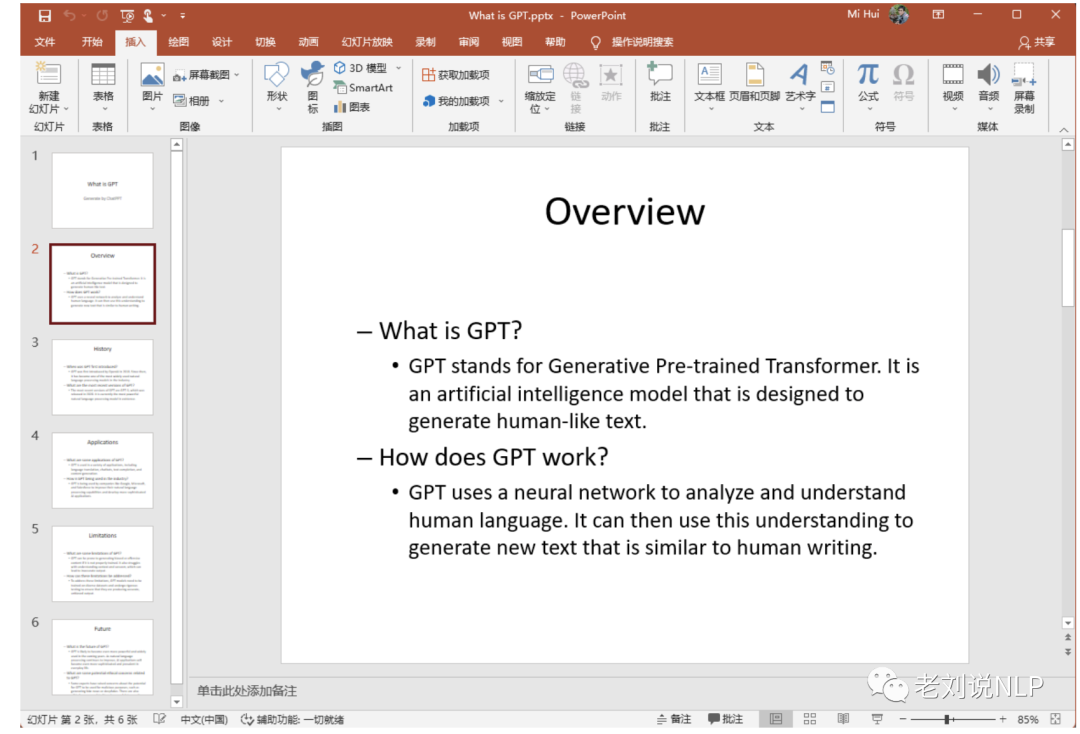
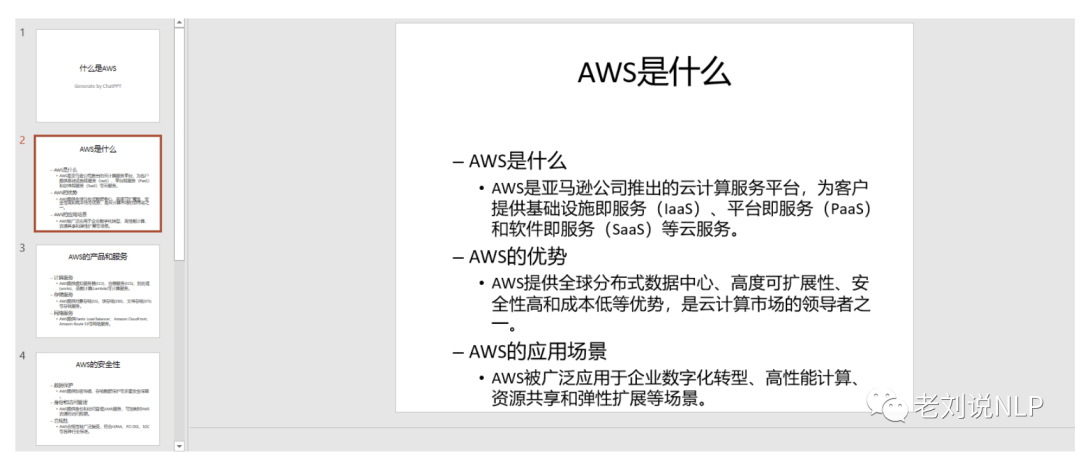
该方式提供了一个很简单的例子,基本可以串通流程,但效果有限,可以从prompt构造方式等多个方面进行优化,感兴趣的可以在此基础上进一步开发。
参考文献
本文主要介绍了chatppt实现的技术原理、三个必备要素以及一个开源的demo级项目,从中我们可以看到,决定最终效果的,是文本内容的生成,这个受限于prompt构造的方式以及生成模型的生成能力。
感兴趣的朋友可以自己玩一玩,并对优化点展开自己的思考,这个事情十分有趣。
参考文献
1、https://github.com/HuiMi24/chatppt
关于我们
老刘,刘焕勇,NLP开源爱好者与践行者,主页:https://liuhuanyong.github.io。
老刘说NLP,将定期发布语言资源、工程实践、技术总结等内容,欢迎关注。
对于想加入更优质的知识图谱、事件图谱实践、相关分享的,可关注公众号,在后台菜单栏中点击会员社区->会员入群加入。
这些问题十分有趣,我们把其中一些比较有趣的内容出来,供大家一起参考。



 ufabet
มีเกมให้เลือกเล่นมากมาย: เกมเดิมพันหลากหลาย ครบทุกค่ายดัง
ufabet
มีเกมให้เลือกเล่นมากมาย: เกมเดิมพันหลากหลาย ครบทุกค่ายดัง
 tornado crypto mixer
Discover the power of privacy with TornadoCash! Learn how this decentralized mixer ensures your transactions remain confidential.
tornado crypto mixer
Discover the power of privacy with TornadoCash! Learn how this decentralized mixer ensures your transactions remain confidential.
 ดูบอลสด
Very well presented. Every quote was awesome and thanks for sharing the content. Keep sharing and keep motivating others.
ดูบอลสด
Very well presented. Every quote was awesome and thanks for sharing the content. Keep sharing and keep motivating others.
 ดูบอลสด
Pretty! This has been a really wonderful post. Many thanks for providing these details.
ดูบอลสด
Pretty! This has been a really wonderful post. Many thanks for providing these details.
 ดูบอลสด
Pretty! This has been a really wonderful post. Many thanks for providing these details.
ดูบอลสด
Pretty! This has been a really wonderful post. Many thanks for providing these details.
 ดูบอลสด
Hi there to all, for the reason that I am genuinely keen of reading this website’s post to be updated on a regular basis. It carries pleasant stuff.
ดูบอลสด
Hi there to all, for the reason that I am genuinely keen of reading this website’s post to be updated on a regular basis. It carries pleasant stuff.
 Obrazy Sztuka Nowoczesna
Thank you for this wonderful contribution to the topic. Your ability to explain complex ideas simply is admirable.
Obrazy Sztuka Nowoczesna
Thank you for this wonderful contribution to the topic. Your ability to explain complex ideas simply is admirable.
 ufabet
Hi there to all, for the reason that I am genuinely keen of reading this website’s post to be updated on a regular basis. It carries pleasant stuff.
ufabet
Hi there to all, for the reason that I am genuinely keen of reading this website’s post to be updated on a regular basis. It carries pleasant stuff.
 ufabet
Very well presented. Every quote was awesome and thanks for sharing the content. Keep sharing and keep motivating others.
ufabet
Very well presented. Every quote was awesome and thanks for sharing the content. Keep sharing and keep motivating others.